数值
数值
本节首先讨论 java.lang 包中的 Number 类及其子类,并说明在哪些情况下应使用这些类的实例化而非基本数值类型。
本节还介绍了 PrintStream 和 DecimalFormat 类,它们提供了用于写入格式化数值输出的方法。
最后,我们讨论了java.lang 包中的 Math 类。该类包含数学函数,用于补充语言内置的运算符功能。此类提供了三角函数、指数函数等相关方法。
在处理数字时,大多数情况下你会在代码中使用基本类型。例如:
int i = 500;
float gpa = 3.65f;
byte mask = 0x7f;
然而,使用对象替代基本数据类型是有其理由的,Java平台为每种基本数据类型都提供了包装类。这些类将基本数据类型”包装”成对象。通常,包装操作由编译器完成——当你在需要对象的位置使用基本数据类型时,编译器会自动将该类型装箱到对应的包装类中。同样地,当需要基本数据类型时使用数字对象,编译器会自动为你解除包装。更多信息请参阅”自动装箱与拆箱”章节。
所有数字包装类都是抽象类 Number 的子类: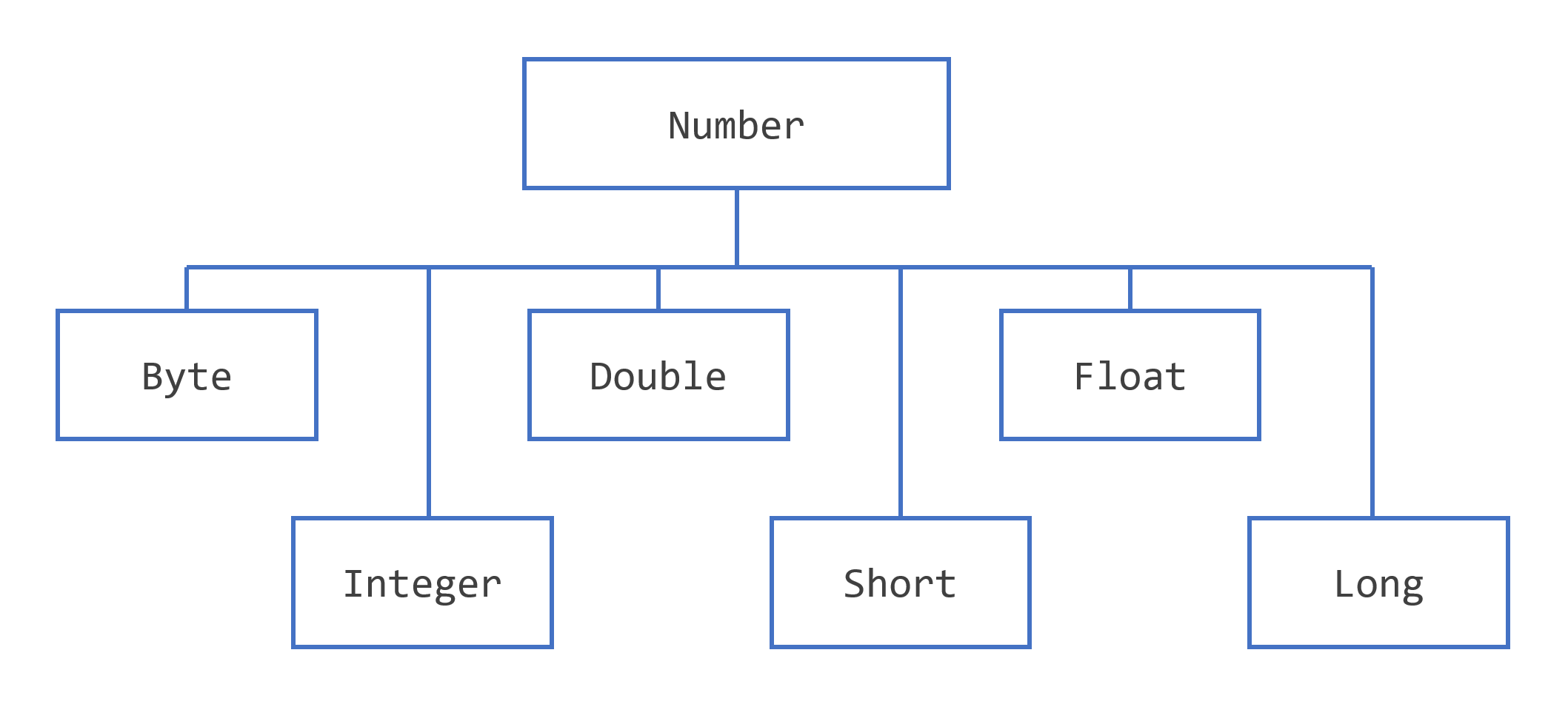
注意:Number 还有另外四个子类在此未作讨论。BigDecimal 和 BigInteger用于高精度计算,AtomicInteger 和 AtomicLong 则用于多线程应用程序。
使用Number对象而非原始类型可能有以下三个原因:
- 作为方法的参数,该方法期望接收一个对象(常用于操作数字集合时)。
- 使用类定义的常量(如 MIN_VALUE 和 MAX_VALUE),这些常量提供了数据类型的上下界。
- 使用类方法将值转换为其他基本类型并反向转换,将值转换为字符串并反向转换,以及在不同数制(十进制、八进制、十六进制、二进制)之间进行转换。
下表列出了Number类所有子类都实现的实例方法。
以下方法将此Number对象的值转换为返回的原始数据类型。
- byte byteValue()
- short shortValue()
- int intValue()
- long longValue()
- float floatValue()
- double doubleValue()
以下方法将此 Number 对象与参数进行比较。
- int compareTo(Byte anotherByte)
- int compareTo(Double anotherDouble)
- int compareTo(Float anotherFloat)
- int compareTo(Integer anotherInteger)
- int compareTo(Long anotherLong)
- int compareTo(Short anotherShort)
- boolean equals(Object obj)
equals(Object obj) 方法用于判断该数字对象是否与参数相等。若参数不为空且与该对象类型相同、数值相等,则该方法返回 true。对于 Double 和 Float 对象,Java API 文档中还规定了额外要求。
每个 Number 类都包含其他方法,这些方法可用于将数字转换为字符串或从字符串转换为数字,以及在不同数制之间进行转换。下表列出了 Integer 类中的这些方法。其他 Number 子类的方法与此类似:
| 方法 | 说明 |
|---|---|
| static Integer decode(String s) | 将字符串解码为整数。可接受十进制、八进制或十六进制数字的字符串表示形式作为输入。 |
| static int parseInt(String s) | 返回一个整数(仅限十进制)。 |
| static int parseInt(String s, int radix) | 根据输入的十进制、二进制、八进制或十六进制(基数分别为10、2、8或16)数字的字符串表示形式,返回一个整数。 |
| String toString() | 返回一个字符串对象,表示此整数的值。 |
| static String toString(int i) | 返回一个字符串对象,表示指定的整数。 |
| static Integer valueOf(int i) | 返回一个整数对象,该对象持有指定基本数据类型的值。 |
| static Integer valueOf(String s) | 返回一个整数对象,该对象持有指定字符串表示形式的值。 |
| static Integer valueOf(String s, int radix) | 返回一个Integer对象,该对象包含指定字符串表示形式的整数值,该值使用基数参数进行解析。例如,若s = “333”且基数 = 8,则该方法返回八进制数333对应的十进制整数值。 |
格式化数值打印输出
先前您已看到使用 print 和 println方法将字符串输出到标准输出 System.out 的用法(这篇文章是2021年写的,当时还没有IO.println()方法,所以这里还是System.out方法)。由于所有数字均可转换为字符串,您可利用这些方法输出任意混合的字符串与数字。然而Java编程语言还提供了其他方法,当输出包含数字时,这些方法能让您对打印结果实现更精细的控制。
Printf 和 Format 方法
java.io 包包含一个 PrintStream 类,该类提供了两个格式化方法,可用于替代 print 和 println。这两个方法 format 和 printf 功能等效。你一直使用的 System.out 恰好是一个 PrintStream 对象,因此可以在 System.out 上调用 PrintStream 的方法。这样,在代码中任何原本使用 print 或 println 的位置,你都可以改用 format 或 printf。例如:
System.out.format(.......);这两个 java.io.PrintStream 方法的语法相同:
public PrintStream format(String format, Object... args)其中 format 是指定格式化样式的字符串,args 是采用该格式化样式打印的变量列表。一个简单的示例如下:
System.out.format("The value of " + "the float variable is " +
     "%f, while the value of the " + "integer variable is %d, " +
     "and the string is %s", floatVar, intVar, stringVar);
第一个参数 format 是一个格式字符串,用于指定如何格式化第二个参数 args 中的对象。该格式字符串包含纯文本以及格式指定符——这些特殊字符用于格式化 Object… args 的参数。(Object… args 的表示法称为 varargs,表示参数数量可能变化。)
格式指定符以百分号(%)开头,以转换符结尾。转换符是一个字符,用于指示待格式化的参数类型。在百分号(%)与转换符之间,可选地包含标志符和指定符。转换符、标志符和指定符种类繁多,其详细说明详见java.util.Formatter类文档。
示例如下:
int i = 461012;
System.out.format("The value of i is: %d%n", i);
%d 指定该单一变量为十进制整数。%n 是平台无关的换行符。输出结果为:
The value of i is: 461012printf 和 format 方法具有重载特性。每种方法都包含以下语法的版本:
public PrintStream format(Locale l, String format, Object... args)要按法语系统打印数字(该系统使用逗号代替英语浮点数表示法中的小数点),例如,可使用:
System.out.format(Locale.FRANCE,
    "The value of the float " + "variable is %f, while the " +
    "value of the integer variable " + "is %d, and the string is %s%n",
    floatVar, intVar, stringVar);
一个例子
下表列出了在随后的示例程序 TestFormat.java 中使用的部分转换器和标志。
| 转换器 | 标志位 | 说明 |
|---|---|---|
| d | 十进制整数 | |
| f | 浮点数 | |
| n | 适用于运行应用程序的平台的新行字符。应始终使用 %n,而非 \n。 | |
| tB | 日期与时间转换——特定区域的月份全称。 | |
| td,te | 日期与时间转换——月内日期采用两位数表示。 td格式会根据需要添加前导零,te格式则不添加。 |
|
| ty,tY | 日期与时间转换——ty = 2位年份,tY = 4位年份。 | |
| tl | 日期与时间转换——12小时制中的小时。 | |
| tM | 日期与时间转换——分钟采用两位数表示,必要时补零。 | |
| tp | 日期与时间转换——区域设置特定的上午/下午(小写)。 | |
| tm | 日期与时间转换——月份采用两位数表示,必要时补零。 | |
| tD | 日期与时间转换——等同于 %tm/%td/%ty 格式。 | |
| 08 | 宽度为八个字符,必要时补零。 | |
| + | 包含符号,无论是正号还是负号。 | |
| , | 包含特定区域设置的分组字符。 | |
| - | 左对齐。 | |
| .3 | 小数点后保留3位。 | |
| 10.3 | 宽度为10个字符,小数点后保留3位。 |
以下程序展示了使用format函数可实现的部分格式化效果。运行程序后自行查看输出结果:
public class TestFormat {
    public static void main(String[] args) {
        long n = 461012;
        System.out.format("%d%n", n);
        System.out.format("%08d%n", n);
        System.out.format("%+8d%n", n);
        System.out.format("%-8d%n", n);
        System.out.format("%,8d%n", n);
        System.out.format("%+,8d%n%n", n);

        double pi = Math.PI;
        System.out.format("%f%n", pi);
        System.out.format("%.3f%n", pi);
        System.out.format("%10.3f%n", pi);
        System.out.format("%-10.3f%n", pi);
        System.out.format(Locale.FRANCE,"%-10.4f%n%n", pi);

        Calendar c = Calendar.getInstance();
        System.out.format("%tB %te, %tY%n", c, c, c);
        System.out.format("%tl:%tM %tp%n", c,  c, c);
        System.out.format("%tD%n", c);
    }
}
注:本节讨论仅涉及格式化和
printf方法的基础知识。更多细节可参阅本教程中”基本输入输出”部分的”格式化”页面。使用String.format()创建字符串的内容详见字符串章节。
DecimalFormat 类
您可以使用 java.text.DecimalFormat 类来控制数字显示方式,包括控制前导零和尾随零的显示、添加前缀和后缀、设置千位分隔符以及小数点分隔符。DecimalFormat 在数字格式化方面提供了极大的灵活性,但可能会增加代码的复杂性。
下面的示例通过向 DecimalFormat 构造函数传递模式字符串来创建一个 DecimalFormat 对象 myFormatter。随后由 myFormatter 调用格式化方法(该方法由 DecimalFormat 继承自 NumberFormat),该方法接受一个 double 值作为参数,并返回格式化后的数字字符串。
以下是一个演示DecimalFormat用法示例程序:
public class DecimalFormatDemo {
    public static void main(String[] args) {
        customFormat("###,###.###", 123456.789);
        customFormat("###.##", 123456.789);
        customFormat("$###,###.###", 123456.789);
        customFormat("000000.000", 123.78);
    }

    public static void customFormat(String pattern, double value) {
        DecimalFormat myFormatter = new DecimalFormat(pattern);
        String output = myFormatter.format(value);
        IO.println(value + "    " + pattern + "    " + output);
    }
}
输出结果为:
123456.789    ###,###.###    123,456.789
123456.789    ###.##    123456.79
123456.789    $###,###.###    $123,456.789
123.78    000000.000    000123.780
超越基础算术
Java编程语言通过其算术运算符支持基本算术运算:+、-、*、/ 和 %。位于 java.lang 包中的 Math 类提供了用于执行更高级数学计算的方法和常量。
Math 类中的方法均为静态方法,因此可直接从类中调用,如下所示:
Math.cos(angle);注意:使用静态导入语言特性后,无需在每个数学函数前添加 Math 前缀:import static java.lang.Math.*; 这使您能够通过简单名称调用 Math 类的方法。例如:cos(angle);
常量与基本方法
Math 类定义了两个常量:
数学类还包含40多个静态方法。下表列出了若干基本方法。
计算绝对值
四舍五入一个值
- double ceil(double d):返回大于或等于参数的最小整数。以 double 类型返回。
- double floor(double d):返回小于或等于参数的最大整数。返回值为双精度浮点数。以 double 类型返回。
- double rint(double d):返回与参数数值最接近的整数。以 double 类型返回。
- long round(double d) 和 int round(float f): 返回最接近参数的 long 或 int 类型值(具体取决于方法的返回类型)。
后续还列举了很多方法,这里不再展开,可以参考API文档。
以下程序 BasicMathDemo 演示了如何使用其中一些方法:
public class BasicMathDemo {
    public static void main(String[] args) {
        double a = -191.635;
        double b = 43.74;
        int c = 16, d = 45;

        System.out.printf("The absolute value of %.3f is %.3f%n", a, Math.abs(a));
        System.out.printf("The ceiling of %.2f is %.0f%n", b, Math.ceil(b));
        System.out.printf("The floor of %.2f is %.0f%n", b, Math.floor(b));
        System.out.printf("The rint of %.2f is %.0f%n", b, Math.rint(b));
        System.out.printf("The max of %d and %d is %d%n", c, d, Math.max(c, d));
        System.out.printf("The min of %d and %d is %d%n", c, d, Math.min(c, d));
    }
}
程序输出如下:
The absolute value of -191.635 is 191.635
The ceiling of 43.74 is 44
The floor of 43.74 is 43
The rint of 43.74 is 44
The max of 16 and 45 is 45
The min of 16 and 45 is 16
指数与对数方法
下表列出了 Math 类的指数和对数方法。
- double exp(double d):返回自然对数的底数 e 的幂次,该幂次为参数的值。
- double log(double d):
返回参数的自然对数。 - double pow(double base, double exponent):返回以第一个参数为指数,第二个参数为幂次的值。
- double sqrt(double d):返回参数的平方根。
以下程序 ExponentialDemo 将显示自然对数底e的值,然后对随机选取的数值依次调用上表中列出的各项方法:
public class ExponentialDemo {
    public static void main(String[] args) {
        double x = 11.635;
        double y = 2.76;

        System.out.printf("The value of e is %.4f%n", Math.E);
        System.out.printf("exp(%.3f) is %.3f%n", x, Math.exp(x));
        System.out.printf("log(%.3f) is %.3f%n", x, Math.log(x));
        System.out.printf("pow(%.3f, %.3f) is %.3f%n", x, y, Math.pow(x, y));
        System.out.printf("sqrt(%.3f) is %.3f%n", x, Math.sqrt(x));
    }
}
输出如下:
The value of e is 2.7183
exp(11.635) is 112983.831
log(11.635) is 2.454
pow(11.635, 2.760) is 874.008
sqrt(11.635) is 3.411
后面还有三角函数的例子,这里就不再继续展开了。
随机数
random() 方法返回一个在 0.0 到 1.0 之间伪随机选取的数值。该范围包含 0.0 但不包含 1.0,即满足:0.0 <= Math.random() < 1.0。若需获取不同范围的数值,可对随机方法返回值进行算术运算。例如要生成 0 到 9 之间的整数,可编写如下代码:
int number = (int)(Math.random() * 10);通过将数值乘以10,可能取值的范围变为 0.0 ≤ number < 10.0。
当需要生成单个随机数时,使用 Math.random 效果良好。若需生成随机数序列,应创建 java.util.Random 的实例,并调用该对象的方法来生成数值。